Notes that stay yours.
Owly keeps every note as a plain Markdown file in a folder you choose. No account. No subscription. No proprietary database in the middle. Keep the folder in iCloud Drive or one you picked, delete Owly tomorrow, and your notes are still there, readable in any editor on any machine.
- Mac · free
- iPhone and iPad · on the App Store
- Apple Watch
- Mac version 0.1.0
Two ways in
Owly for Mac
A free download, signed and notarised by Apple. Safari unzips it for you; drag Owly to your Applications folder. The first time you open it macOS will ask once whether you are sure, and name the developer it was signed by: Manuel Re.
Version 0.1.0 · 19 September 2026 · macOS 14 or later · Apple silicon
Download forMacOwly for iPhone and iPad
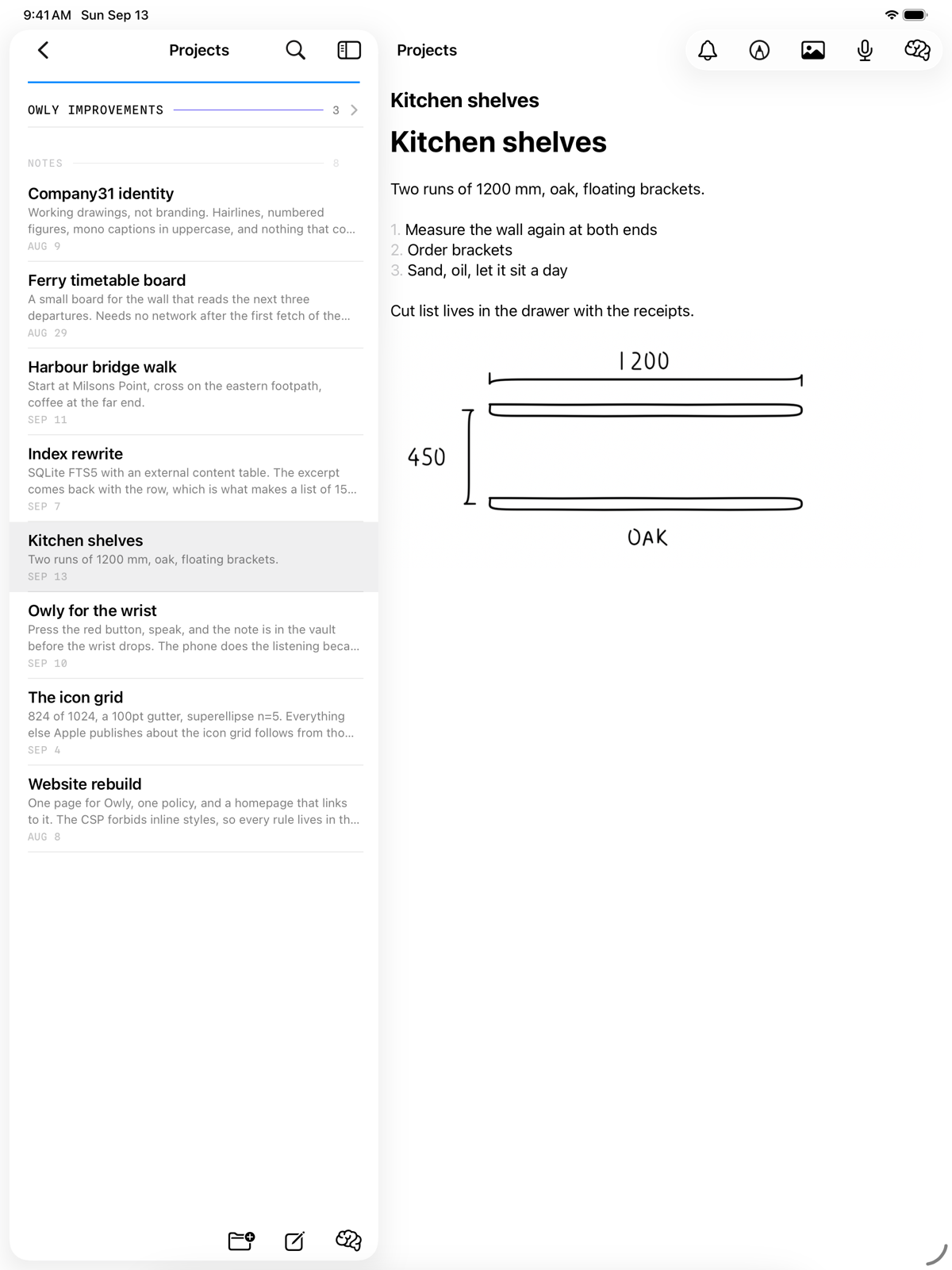
One app for both, free, and on the App Store, with the Apple Watch app inside it. It reads the same Markdown files as the Mac. On an iPad it opens with your notes beside the one you are writing, and takes an Apple Pencil.
Version 1.0.0 · September 2026 · iOS 17 or later · watchOS 11 or later

A writing app that leaves the files alone
Your folder, your files
Point Owly at any folder. Notes are .md files with ordinary names. Put the folder in iCloud Drive and your Macs stay in step; keep it local and nothing leaves the machine. Same code either way.
Markdown as it reads
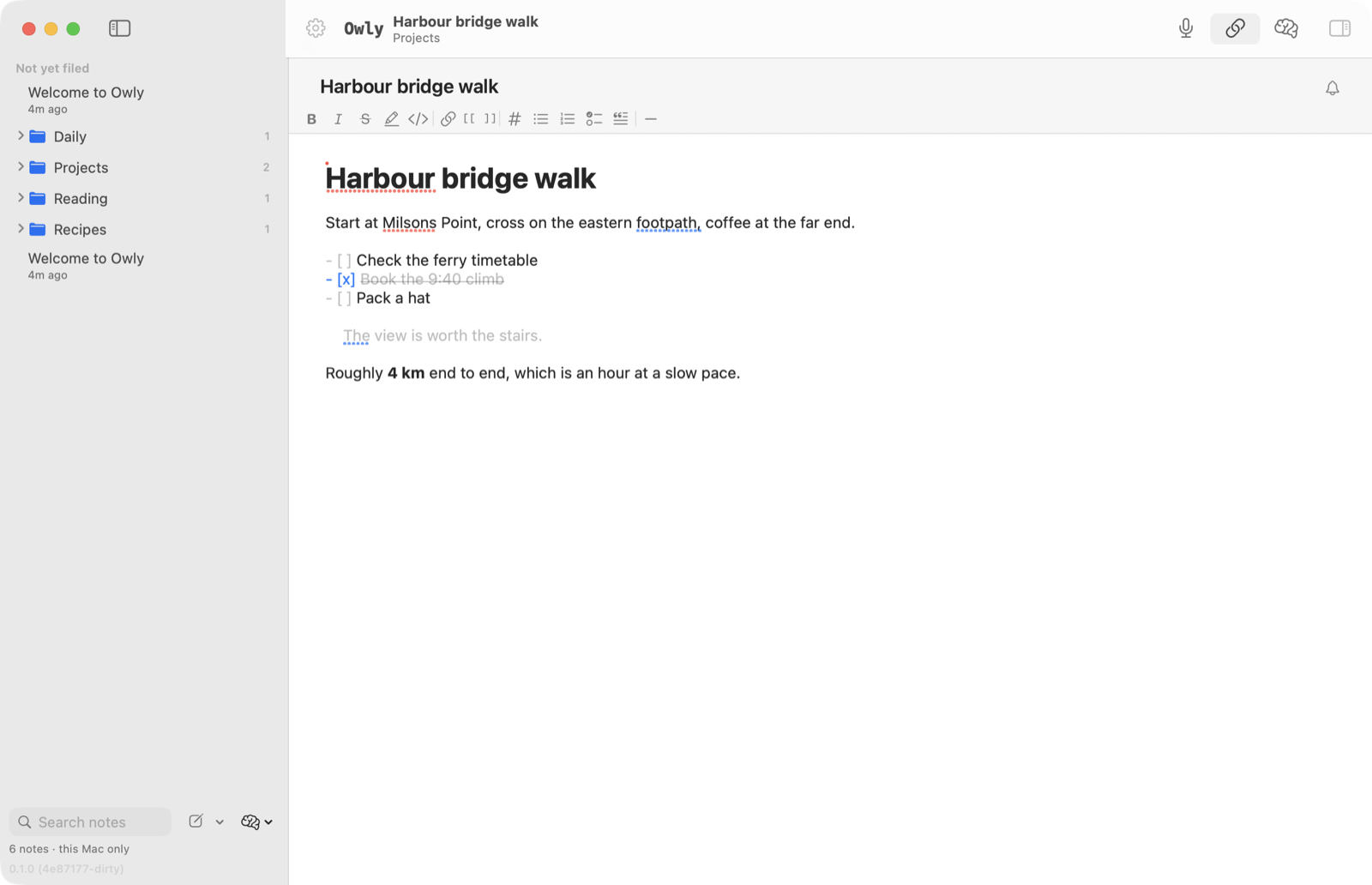
Headings, bold, lists, quotes and links are styled in place as you type, so the note looks like what it says without hiding the characters that make it a plain file.
Find it again
Search by name or by what is inside. Owly also builds a meaning-based index on your own machine, so a search can find the note you meant rather than only the word you typed.
Reminders on a note
Put a bell on any note and it comes back when you asked. The reminder lives in the note’s own front matter, so it travels with the file.
Dictation that hears formatting
Speak a note and say “bold this” or “quote this” as you go. Speech becomes text on your device whenever your language supports it.
Optional AI, on your terms
Ask questions about your notes, tidy a draft, or let Owly suggest where a note belongs. Choose Apple Intelligence or a model running on your own Mac and nothing leaves it. Choose a cloud provider and you use your own API key. There is no Company31 server in any of it.
On the Mac
- A quick-capture window on a global shortcut
- Daily notes and note templates
- Links between notes, and what links back
- Import from Apple Notes, Obsidian and Notion; export the lot
- A trash you can undo
On the iPhone
- The same vault, the same files
- Write, file, search, and set reminders
- Reminders that come back — daily, weekdays, weekly, monthly or yearly
- Mark a note high priority and it says so in the list
- Dictate a note, or add a photo
- Record a meeting straight into your vault
- What is coming up, and what is not yet filed
On the iPad
- The same app as on iPhone, with your notes beside the one you are writing
- Draw with Apple Pencil straight into a note
- Tap a sketch to pick up where you left off
- Mark up a photo; the original stays as it was
- Turn handwriting into typed text, recognised on the iPad
- A sketch is an ordinary image in your vault, readable anywhere
On the Apple Watch
- Press the red button, speak, and it lands in your vault
- Up to 12 seconds a note, with your wrist raised — the watch counts the seconds down
- A bar empties as you talk, and it buzzes once when 3 seconds are left
- Your iPhone writes down what you said
- It waits on the wrist if your iPhone is away
- Start, mark and stop a meeting your iPhone records
- Your iPhone’s settings apply — the watch just captures
What Owly is not
- No account, and nothing to sign in to
- No sync service of our own — that is iCloud Drive, or your own folder
- No team sharing or collaboration
- No Windows, Android or web version
- Not open source, though the notes are as open as files get
What it looks like in use

Where your writing actually goes
Company31 has no server in Owly. There is no account, no sign-in, no analytics and no crash reporting. We cannot read your notes, because they never come to us. Your notes are files in your folder, on your device.
Two things can leave, and neither goes to us. The first is entirely your choice: if you choose a cloud AI provider — Claude, Gemini or OpenAI — and paste in your own API key, then asking Owly a question sends the text it needs to that provider to answer. For a question asked inside a note, that is the note plus whatever else in your vault fits the question, or the note alone if you choose This note only. For a question about your whole vault, Owly sends as much of the vault as the model can hold, along with the note titles and folder names, and it tells you which it did. Choose Apple Intelligence or a model running on your own Mac instead, and none of your writing leaves the device. The second is speech: when you dictate, or speak a note into your watch, your iPhone asks Apple’s speech recognition to turn it into words — on the device itself wherever your language supports that, and on Apple’s servers where it does not.
The full detail — every address anything is ever sent to, where API keys are kept, what iCloud does and does not see — is in the Owly privacy policy.
Before you download.
What happens to my notes if Owly disappears?
Nothing. They are Markdown files in a folder you picked, with names you can read. Open them in TextEdit, Obsidian, VS Code, or anything else that reads text. That is the whole point of the app, and it is why there is no database and no export step to worry about. On iPhone and iPad that is true of a folder you picked in Settings, such as one in iCloud Drive. The default On My iPhone › Owly folder belongs to the app and iOS removes it with the app, so move your notes first.
Does it sync between my Mac, iPhone and iPad?
Through iCloud Drive, if you want it to. Put your vault folder in iCloud Drive and open that same folder on each device; Apple does the syncing and Company31 is not involved. Keep the folder somewhere local instead and each device simply holds its own vault.
How long can a note from the Apple Watch be?
12 seconds, with your wrist raised. That fits inside the time every Apple Watch keeps its screen on after a tap, so it holds on every watch at every setting. The watch shows the seconds left in large figures while you talk, and the rule across the foot of the screen empties as they go; it buzzes once when 3 seconds remain. At zero it stops on its own and hands what you said to your iPhone — nothing is lost. Press the Digital Crown before then and what you had said so far is kept and sent the same way. A note is a sentence or two; for anything longer, start a meeting instead, where your iPhone does the recording and the watch is just the remote.
Is it really free?
Yes. The Mac app is free, and so is the app for iPhone, iPad and Apple Watch, with no in-app purchases and nothing to subscribe to. If you use a cloud AI provider you pay that provider directly for what you use, with your own key — Owly does not resell anything or take a cut.
Why does my Mac warn me when I open it?
Because you downloaded it from a website rather than the App Store. Owly is signed and notarised with Apple, so macOS checks it and then asks once whether you are sure, naming the developer it was signed by. Open it, and it will not ask again.
Does it run on an iPad, or an Intel Mac?
On an iPad, yes. It is the same app as on the iPhone, laid out for the bigger screen: your notes stay in a list on the left while the one you are writing fills the rest, and you can draw into a note with an Apple Pencil. The Mac build is Apple silicon only; an Intel version is still on the list.
What happens to a sketch outside Owly?
It is still there. A sketch is saved as an ordinary PNG image in your vault’s Attachments folder, and the note links to it the way it would link to a photo, so any Markdown editor shows the drawing. Beside it sits a small .owlysketch file holding the pen strokes, which is what lets Owly reopen the sketch and keep drawing. You do not need an Apple Pencil: a finger draws too, unless you have told your iPad to draw only with the Pencil.
Do I need to use the AI features?
No. Owly is a complete writing app without them. On a device with Apple Intelligence, Owly can suggest a title on the device itself, and nothing leaves it. Nothing is sent to a cloud provider until you choose one yourself and add your own key.
What changed
Owly for iPhone, iPad and Apple Watch is on the App Store, version 1.0.0. One free app for all three, and the same Markdown files as the Mac: keep the vault in iCloud Drive and every device opens the same notes.
A new Mac build. Markdown tables render in the preview, and saved .html and .css pages in the vault open as read-only pages. The sidebar shows the same sections as the iPhone: Coming up, Not yet filed, Recently changed, then your folders. The reminder bell sits at the top of the note as it does on the phone, and the app wears the new one-line owl icon.
Watch notes now promise 12 seconds, the length every Apple Watch keeps its screen on for. The 45 seconds offered before was cut short when the screen dimmed, usually before 20.
Owly for iPad. Your notes stay in a list on the left while the one you are writing fills the rest of the screen. Draw with an Apple Pencil straight into a note; the sketch is saved as an ordinary image in your vault, and a tap on it opens it again to keep drawing. Photos can be marked up without losing the original, and handwriting can become typed text, recognised on the iPad itself. It is the same app as on iPhone.
Reminders can repeat — daily, on weekdays, weekly, monthly or yearly — and one tap on Done moves the next one along, however far behind you are. Any note can be marked high priority. Both are a plain word in the note’s own frontmatter, so you can read and change them in any Markdown editor: repeat: weekly and priority: high. Owly works out which day from the reminder you already set, so there is nothing else to say.
An Apple Watch app: press the red button, speak, and the note lands in your vault with your iPhone writing down the words. Your iPhone can record a meeting into the vault, with the watch as the remote, and a tap marks the moments worth coming back to. A watch note is a sentence or two; the watch counts the seconds down and the rule at the foot of the screen empties as you speak.
Reminders on any note, live Markdown preview, dictation that understands spoken formatting, and a section for what is not yet filed. Folders can be deleted from the iPhone. A new app icon.
First public build for the Mac: the vault, the editor, search, links, quick capture, daily notes, templates, import and export.
If something is wrong, write to a person
Owly is made by one small practice in Sydney. There is no ticket queue and no bot: mail reaches a person, and bug reports are genuinely welcome.
- connect [at] company31.com — for support, bug reports and feature requests.
- Who makes it
- Company31 Pty Ltd, ACN 698 697 166, Sydney, New South Wales, Australia.
- Privacy
- The Owly privacy policy covers the Mac, iPhone, iPad and Apple Watch apps. The website policy covers this site.